
Liabilities Module
InstantAPPLY imports and organises your client's liabilities using Client input, Open Banking and credit report data, allowing for faster and more accurate application preparation.
📌Note: Imported Liabilities data is not automatically added to the application. This allows you to review the information first and decide which items to include.
Also, any Liabilities added here can be used later in the Product Search section.
Review liabilities
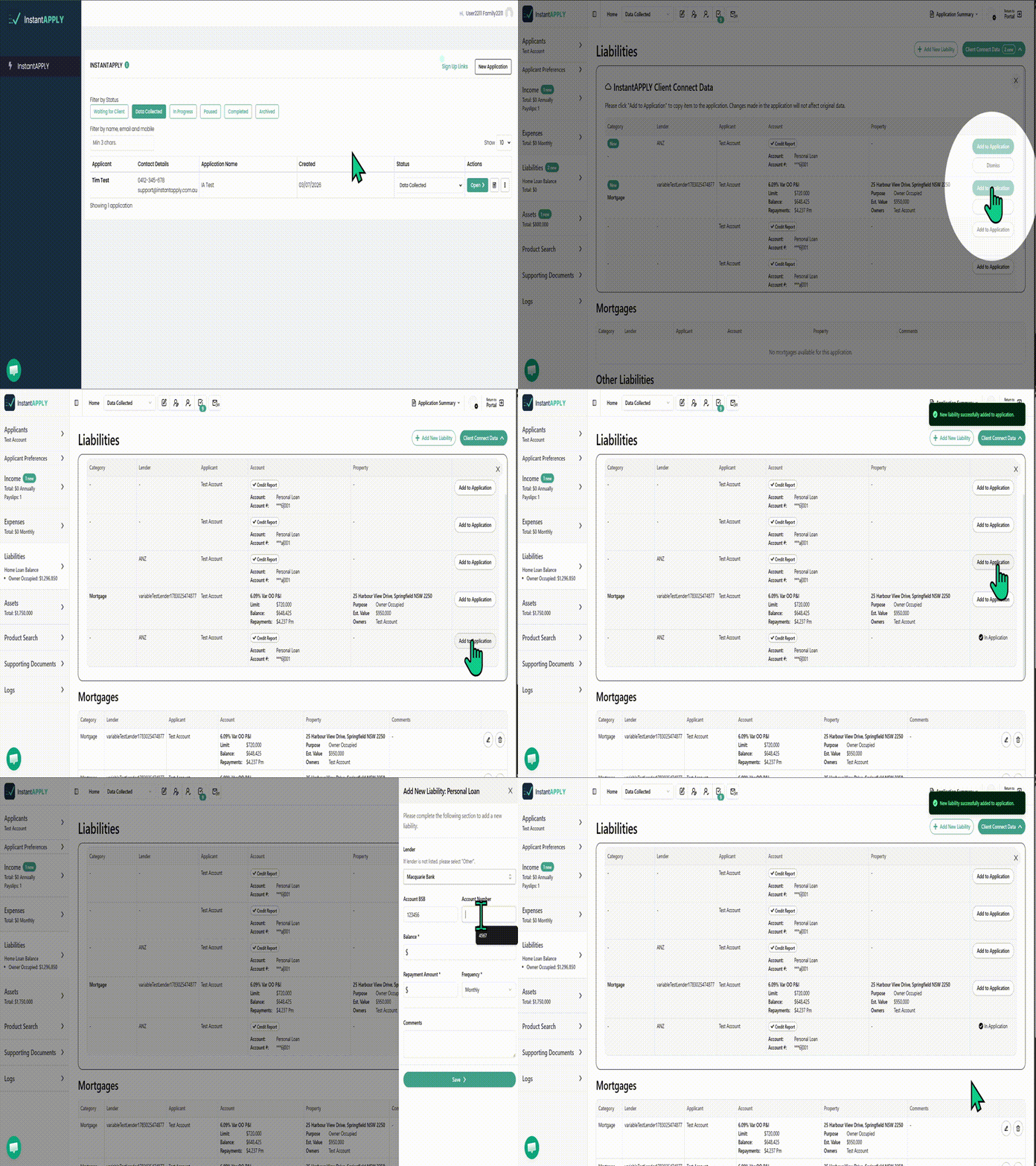
To review imported liabilities, follow these steps:
- Open the client application.
- Select Liabilities.
- Click on Client Connect Data.
- Review the imported liabilities under each category.
- Add to Application or click Dismiss. (Dismissed loans can be added back at any time)
ℹ️ TIP: To manually input additional data, Click on Add New Liability, Select the Type of Liability, then Add the Details.
Missing liabilities
If the credit report shows liabilities that are not connected through Open Banking:
- Confirm with your client that the accounts are still active.
- Ask them to connect any missing bank accounts in InstantAPPLY. For more info, check this article here.
🎯Best practice:
- Prioritise Open Banking liabilities.
- Review liabilities identified in the Credit Report.
- Review duplicate entries before adding to or dismissing it from the application.